Technology is ever changing and always growing and improving.


As what the title of this post states "Technology is ever changing and growing and improving." Some of my old posts are already outdated, and as much as I would like to update those post, it would be a tedious task and I would just make posts of the more recent ones whether it's about an update or just new posts.

The web is always evolving and has always something new to offer, like different new websites like social networking with others now offering a "Location-Based" service, and also changes with updates on different websites, not only on the web like Facebook, which is now the most famous Social Network on the web and around the globe, and also updates on applications and softwares that makes" technology ever changing and always growing and improving.

Even mobile phones and it's operating systems eg. iPhone OS, Android, Symbian, Windows. And other devices like the iPad, computers, hand-held game devices eg. PSP that may come up with a Sony Playstation Phone; opposite of phones that can handle games - a gaming device that now has phone capabilities. And so much more with about endless possibilities.

Technology is ever changing and always growing and improving.

I'm not much into downloading applications or softwares on the web anymore, it sometimes clutter my computer, and others can come with unwanted programs, and since there are now a number of online web tools you can use instead of downloading software, that's what I'm usually into right now, and using extensions and add-ons on my web browser instead, which can be really helpful and fun at the same time.
And, I would still like to make things short and simple, yet helpful and informative on my posts. (Some posts may be in random, but labels and tags will help you navigate through posts). Thanks and hope you enjoy my posts! :)

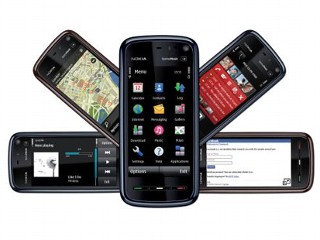
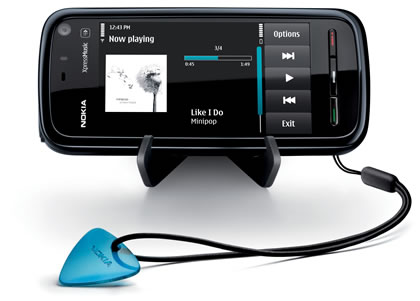
Best Nokia Apps


Best Nokia Apps


crave.cnet.co.uk

Save Printable Files as PDF!


This is a great download that I would recommend. The "CutePDF Writer", which saves a printable file in PDF format. You can use this freeware to instead of print, you can save it on your computer for later use, so you have a printable copy of that file.

You can use this for example when you have a computer that is not connected to a printer to save your file (or save it in a thumb drive), and use it to print on another computer that is connected to a printer whenever you want to. Or you may use it if you just want a copy of that printable file on your computer.

You use this just like printing an ordinary document. Once installed, you select the printer name to be "CutePDF Writer", and select print, and you have a copy of your file to view or print for later!

Click Here to Download:

CutePDF Writer

Free SMS!


Want to send Free Text Messages? Here's a free online app to do just that!

Gizmo's "Gizmo SMS"!


This online tool has a lot of countries to choose from. Select your country, enter the mobile number, your message, enter the code to verify. and hit send!

Or

Dynadel


http://sms.dynadel.com/

Just enter the mobile number. Select the Carrier from US, Canada, UK, France, Sweden, Argentina, and also Philippines! (although only Smart telecom is the only option for Philippines). Enter in your message, and hit send message!

Important:
Some carriers charge for receiving an SMS and this could affect your recipient.

There are also other sites where you can send free sms to, but I think some of them doesn't really work.


For Philippines Carriers, we also have the Chikka website and application for the Philippine carriers. And it's free, you just have to register. Most Filipino's probably know about this already. Although there is a limit to a number of sms per carrier. And after that limit, the person you are sending sms to, may have to reply to your Chikka account in order to continue sending your sms.

As for other carriers abroad, you can use these Free Online Tools above to send sms to your friends and family for free!


There is actually an old fashion way to send sms from your email for free (for additional info). You just have to know what the email address of the carrier you are sending a text message to. These "Free SMS" sites
might have the same mechanics as to sending their text messages.

If you want to try this, you can either search "send free sms from email" from your search engine, to see the email address for carriers (Note that at times these email address of some carriers sometimes change) or check out these sites:

here's a sample of the search result:

http://www.makeuseof.com/tag/email-to-sms/


or

http://www.sms411.net/ (click on the sidebar for complete details on each carrier)

Just type in the 10-digit-number plus the email address of the carrier. For example, if you are sending to an AT&T phone, use this address format 10-digit-number@txt.att.net, as shown here: 4152221212@txt.att.net

So.. text away! and Enjoy!

Awesome Theme for Windows! by Alienware


I have tried changing my windows theme before by using a number of software to install, that was making windows XP look like Vista. Like interactive docks, changing the appearance of start button, and the way it pops out, changing the whole theme, and the likes. There is also some new videos of making windows XP look like windows 7. But you will have to install some software and do some tasks.

And I found a much easier way to do this by just installing one software theme manager from Alienware called AlienGUIse Theme Manager which does everything for you! Changes your whole theme, like wallpaper, icons, and even your windows media player! There is one with an interactive dock too.


(one of sample theme)

AlienGUIse™ Theme Manager is powered by MyColors™ technology from Stardock® and dramatically transforms the appearance of your Microsoft® Windows® operating system into a truly unique display, and features exclusive Alienware-centered skins like, Invader, Darkstar™, ALXMorph™, and the new Xenomorph™. These sleek and stylish Alienware skins vividly alter the appearance of desktop features such as your icons, wallpaper, and Windows Media Player.

Icons

Bold and exciting Alienware custom icons create an unforgettable visual atmosphere for your desktop. From the Internet to the Recycling Bin, your Alienware icons will set a new standard for style.

Media Player (XP Only)

Enter an exhilarating new world of media players with the Alienware media player skin, which delivers dual-gyroscopic animations and custom time digits. Featuring an initial animation sequence, your Alienware media player skin provides the perfect visual complement to your audio experience.


If you don't mind the theme to be by Alienware, this is an awesome download to change the appearance of your whole theme. Works on Vista too!

How to download and install

  1. Click on the Download link located at the top of the page.
  2. Enter your email address.
  3. Save the .exe file to your desktop.
  4. Once Downloaded, run the executable to install AlienGUIse.
Or simply by visiting their site on this link: Alienware: AlienGUIse Theme Manager

Message From Author


Hi Guys! It's been quite awhile since I've made posts on my blog, hope you guys still visit my blog from time to time ;). Since my last post there have been so much stuff that I would like to share, and I don't know where to start. Technology is always growing! But you can always use the sidebar for "Labels" and "Blog Archive" to navigate through pages.

As you can see I've changed my blog layout and template to a much more simple and yet nice looking clean and easy to navigate page. And that is what I would want to change a little about my postings too. I may compose some long ones or some simple and short posts but still informative and straight out. So that I will be able to do more posts. Lets see if this works out to all you readers and me, and hope it will and I will continue to do so ;).

Feel free to comment on this post and all other posts for your feedback. Thanks readers!

Message From Author


Hello Readers! I've been quite busy recently this past few weeks and might hold posts for some time, but will be back soon for more Great and Interesting Stuff on the Web!

For the meantime, keep reading and enjoy my other posts on my Blog! And will be adding posts as soon as I'm free.

Keep posted guys! And thanks for reading my posts!

Subscribe to my Feed! Thanks Again.

By: Macky - Web Junkie Blogger

The Perfect NetBook!


Dell Inspiron Mini 9


The Dell Inspiron Mini 9! Is this the Perfect NetBook? Well, I can say this is the Perfect NetBook! And according to CNET's video review on "Finding the Perfect NetBook" this has most of the specs you should have for a NetBook like:
  • Intel Atom 1.6GHz Processor
  • 16GB SSD Hard Drive
  • Windows XP Home Edition SP2 or Ubutu Linux OS
  • 8.9 inches Screen Size
  • Built-in Webcam VGA-Out
  • Stereo Speakers
  • Headphone/Microphone Jacks
  • 3 USB 2.0
  • SD card reader
  • Ethernet, 802.11 b/g Wi-Fi, optional Bluetooth!
  • Great Spacious KeyBoard!
  • Good Battery Life!
  • Priced Around $350.00 to $500.00


As like most of NetBooks, this one has no Optical Drive, but you can always get one to connect to your NetBook via USB.

Dell as far as I know is very flexible or configurable in terms of choosing parts or software to put on your PC, that's how I know Dell is. You can choose wether to get an XP or Linux, add a built-in Bluetooth/Webcam or not, the size of the Hard Drive, and some more, and all this will vary on how the price of the product will be. And because of this, Dell or you, can choose which ones to combine to create a personalized PC and for this instance "The Perfect Netbook"!

Color comes in Black, and also comes in White and Red.


The Dell Inspiron Mini 9 is a Perfect NetBook! And this is a must-have product for a someone looking for a Great Portable Computer!

Nokia 5800 Xpress Music! vs. Samsung Omina SGH-i900! vs. iPhone!


From left to right: Samsung Omnia SGH-i900, Nokia 5800 Xpress Music, and iPhone 3G!
Which is the Better Phone?


Here it is! Nokia 5800 Xpress Music, Nokia's Touch Screen Phone, is this their iPhone killer? Well, first of all I really like Nokia, I've been using Nokia phones then up to now! Their very user friendly, their popular in Asia and I think in UK. And the best about their phone is, its "UNLOCKED"! Open to all! I've watched a couple of videos about the Nokia 5800 Xpress Music, and its looks real nice. And I sure hope it has good performance! Here are the phones great specifications:
  • Symbian S60 5th edition OS with touch input
  • Accelerometer for auto screen rotation.
  • 3.2 MP AF Carl Zeiss lens, dual LED flash and geo-tagging support
  • GPS with A-GPS function
  • 3.5mm headphone/video-out jack
  • microSDHC card slot (up to 32 GB)
  • 8GB microSDHC card included

Well! Now thats what I want from a phone! You can also use an on-screen QWERY keyboard either by landscape or portrait keyboard, also has a stylus to use. 3.5mm headphone jack used on most headphones, and video-out too! Great 128 internal memory and an 8 GB microSDHC included! Has front camera! WLAN!
Now thats Nokia for you! Great Specs that you want! User Friendly! UNLOCKED!


Here are videos of the Nokia 5800 Xpress Music:


There are lots of iPhone like competitors out or will soon come out in the market, like the G1 Google Android phone from HTC for T-mobile, Samsung Omnia SGH-i900 (I know this is UNLOCKED too), and more.

Here's Videos of Samsung Omnia SGH-i900:


Mysterious Apple Brick Computer!


Think wishful: Concept dream designs of the mysterious Apple Brick have surfaced on blogs.

(Credit: Yves Behar/OLPC)

By now you've probably heard the rumors that Apple is having an event on October 14th, where Steve Jobs will introduce new Apple laptops to the world. At this point, it's unclear whether the lines will be refreshed with new processors and configurations or whether we'll see a more substantial redesign to the Macbook and Macbook Pro. And then there's the big secondary question of what's going on with the MacBook Air?

Chances are, if there's an update to the Air, we'll just see a bump in processor speed and storage capacity, particularly in the solid-state version of the Air. But, then there's this mysterious thing called the Brick that started with a site called 9to5Mac and made a few orbits around the blogsphere. Some say it might be a tablet. Others think it's a new version of Apple TV. And many are conjecturing that it's a low-cost, lightweight Netbook to match up against all the mini notebooks hitting the marketing--including models from Dell, HP, Asus.

If, indeed, we're about to be introduced to a MacBook Mini or an Apple Netbook (or, maybe Jobs does go counter-intuitive and calls this lightweight machine the Brick), isn't it time to ditch the first-gen Air while it still has some value? I figure the one-two punch of a refreshed Air with a new budget-price Apple notebook will knock $300-$500 off a used Air's current selling price.

Or, with two weeks to go before the press event, is it already too late? Is the Air already utterly devalued? Let me know what you think.

Great Digital Cameras (Update)


Ok, I have made a post about choosing between two Great Digital Cameras. The Canon PowerShot A590 which is rated as the Best Budget Digital Camera for Consumers, small but a bit bulky for me; and the New Sony CyberShot T700 which is a Great Touch Screen Camera with sleek design. I'm looking for a Great Digital Camera with a fair price!


You can get great quality photos and videos plus great features from the Canon PowerShot A590 with a very good price of not more than $2oo.oo! but the downside for me, well not really a downside but, I was looking for a more sleek design.


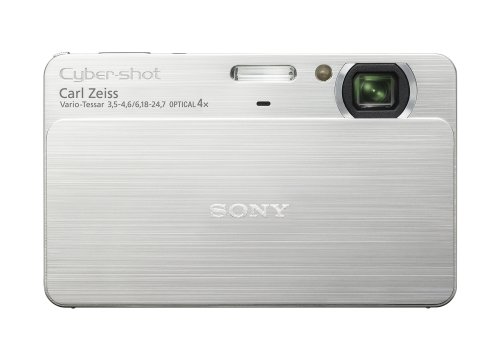
The Sony CyberShot T700 is an awesome touch screen Digital Camera with great quality photos and videos plus features, has 4GB internal memory, has colors to choose from. It has a very nice sleek design, but expensively priced around $400, if you can spend around this price then this is a great choice.


I had a lot of choices before narrowing down to the first two Digital Camera. But I made another search, also comparing the first two Digital Camera. And I found another two Great Digital Cameras, actually about the same as the first two, a battle against Canon and Sony!


The Canon PowerShot SD750 is a really Great Digital Camera rated highly by editors and users, great quality, features and great price of $211.95! I know it sound like the description I wrote for the Canon PowerShot A590, but this one is more compact and highly rated! This became my Top Choice!


The Sony CyberShot T100 comes from the Sony CyberShot T-series, this one is late model but still highly rated as opposed to newer series, but of'course not better than the Sony CyberShot T700 although they both are highly rated. This Digital Camera is not a touch screen but to some people that doesn't matter, it has great quality photos and videos, features, nice sleek design, colors to choose from, and priced around $250.00 to $280.00 or higher.

I'm having difficulty choosing between:
"really top rated, fair priced, and so-so commonly used design "
or the
"still top rated, slightly higher than fair price, and nice sleek design"

And I choose... The Sony CyberShot T100! Has great quality photos and videos, features, nice sleek design and will pay for a slightly higher than fair price!

What would you choose?


Here are some of the Digital Cameras I've compared from the rest:


Sony CyberShot w130


Sony CyberShot DSC-W55


Sony Cybershot dsc-h50


Kodak m1033


Canon PowerShot SD850 IS


Nikon CoolPix s60

Mortal Kombat vs DC Universe!


When Worlds Collide! Mortal Kombat vs DC Universe is a crossover fighting game soon to be released on PlayStation 3 and Xbox 360. It's release date is said to be on the 10th of November. It has great gameplay, like the good old signature attacks and fatalities! I just love Scorpion's "get over here!" and then the uppercut. There's also some mid-air fighting while falling and looks great, and more.

Characters

Mortal Kombat characters DC Comics characters
Baraka Batman
Jax Catwoman
Kano Darkseid
Kitana Deathstroke
Liu Kang The Flash
Raiden Green Lantern
Scorpion The Joker
Shang Tsung Lex Luthor
Shao Kahn Shazam
Sonya Blade Superman
Sub-Zero Wonder Woman


It also has a Single Player Mode where players choose their storyline experience with either the Mortal Kombat or DC Universe. The unique storyline intertwines both the Mortal Kombat and DC Universes and characters into an exclusive dynamic fighting adventure.

Environmetns: Players will face off in various iconic arenas like Metropolis and Gotham City from the DC Universe side and Hell and Graveyard from the Mortal Kombat side, as well as several never-before-seen combo arenas that blend the two universes together!


Official Website: worldscollide.com

Mortal Kombat V.S DC Universe Interview at E3 08

Unusual and Funny Questions about Internet and Technology


WASHINGTON (AFP) - - Computer help desks are used to fielding oddball requests but sometimes the questions leave even the best of them stumped.

Such as: "Why isn't my wireless mouse connected to the computer?"

Or: "Can you reset the Internet for me?"

Then there was the questioner who asked: "Where can I get software to track UFOs?"

He was presumably not the same person who called in to report that "a skunk ate my cable."

Robert Half Technology, a provider of information technology professionals based in Menlo Park, California, asked 1,400 chief information officers from companies across the United States to come up with the most baffling questions their help desks or technical support teams had ever received.Among the more unusual were:

-- "My computer is telling me to press any key to continue. Where is the 'any' key?"

-- "Can you rearrange the keyboard alphabetically?"

-- "My daughter is locked in the bathroom, can you pick the lock?"

-- "Can you tell me the weather forecast for next year?"

-- "Can you install cable TV on my PC?"

Then there was the computer user who confused the CD-ROM drive with a drink holder and asked: "How do I get my computer's coffee-cup holder to come out again?"

Katherine Spencer Lee, executive director of Robert Half Technology, said such queries were a test of the skills of the help and technical support desks.

"These unusual requests highlight the need for technical support personnel to also demonstrate patience, empathy and a sense of humor," she said.

by: Yahoo

Molly Wood of CNET TV's Buzz Report


Molly Wood in an Executive Editor at CNET, and the host of CNET TV's Buzz Report. She's so fun to watch with her funny and outrageous comments on the latest buzz and technology! You get the latest buzz from her shows and also be entertained! I think I'm too much of a CNET guy? Here are some sample of her videos:


Watch more of her videos at cnettv.com and click on Cnet Tech Shows and select Buzz Report.

Quick Tips when Using your Digital Camera


On my recent post about choosing a Great Digital Camera, I've actually searched also about how to take great pictures using a Digital Camera. And I found great videos on how to do just that. And as always, I search contents on different sites, most of which is CNET, and they featured a topic about Quick Tips when using your Digital Camera!

I was just thinking if this is a coincidence? I do a lot of searches that interests me and some if not most, I look for on CNET. They feature stuff that interests me, and sometimes I post on my blog just the ones on my mind that interest me and when I visit their site, I see that they feature the ones I'm interested in! Like this topic I'm currently posting on my blog
(although this videos are not so recent from their archive, but they featured it back). I don't know if I'm writing in circles here, but you get what I mean right? Or is it just me? ;)

Anyway, here's videos on Quick Tips when using your Digital Camera, from focusing, zooming, depth, when to use flash, aperture, and more:


Great Digital Cameras


I've been recently doing some searches on what kind new and great digital camera to get, there are tons to choose from! Like Canon PowerShot, Sony CyberShot, Nikon Coolpix, Kodak Easyshare, and more.

I was thinking of what kind of preferences to choose from. Of'course what I want is the one's that take great image quality, and I found out that its not actually by how much megapixel is better but by how it captures image quality. And there's also the size, whether I should get a slim and sleeker look or the not so compact size but great image quality. There's also the features, whether it has additional functions like cropping,red-eye removal, face detection, smile capture, touch screen, usb and av cable, shutter speed, manual and automatic focus, optical stabilization, video capture, memory capacity and more.

And lastly the price, I have two videos to show on whether I should get a Canon PowerShot A590, mid-sized but rated as the best overall digital camera with lots of feature and great image quality by consumersearch.com and noted by CNET as the best budget camera under $200 price; or the newer Sony CyberShot DSC-T700 which has great image quality and has integrated memory of 4GB, ultra-compact,and noted by CNET that it will satisfy those who like showing off their pictures as much as they like taking them and priced under $400.

You can also try searching and comparing Digital Cameras at CNET plus look for their "CNET's Digital Camera Finder, step-by-step guide"


Canon PowerShot A590

by: Tigertv.com


Sony CuberShot DSC-T700

by: CNET.com

What do you think?

T-Mobile G1 Android Phone - CNET's First Look


CNET at the launch of T-Mobile G1 Android Phone.


T-Mobile press conference, here are what some experts think:

The T-Mobile G1 - HTC Dream Android Phone Realeased!


The long-awaited HTC Dream, the first commercial handset running Google's Android operating system, will be coming to T-Mobile as the G1 for $179 on October 22nd. Featuring a 3-inch touchscreen, internet navigation buttons and a full QWERTY keypad, the smartphone market has finally broken free of Symbian, Windows Mobile and the sweet clutches of fruit companies. Read on for the details, and you can decide whether or not the competition is a good thing.

Features:

Date and Pricing
$179 on October 22nd. (That's with a two year contract.) Unlimited internet with "some messaging" will run $25/month. Unlimited internet and messaging is $35/month. Data plans will require voice plans.

Screen
The G1 sports a 3.17" 65K color touchscreen that runs in HVGA (480×320) resolution.

Battery Life
You can talk for 5 hours, or keep the phone in standby for 130 hours.

Camera
3.1MP, or right around 35mm 4x6 print quality.

Frequency Fun
GSM/GPRS/EDGE/Wi-Fi and UMTS/HSDPA
850/900/1700/1800/1900/2100Mhz

Dimensions
4.60 x 2.16 x 0.62; Weight: 5.6 ounces. And available in white, black and brown.

Storage
1GB MicroSD card preinstalled. Supports 8GB MicroSD.

GPS
Of course, what would Google Maps be without it?

Google Maps
As we've seen in a recent update, the G1's Maps application will integrate Street View so you can see where you are going. But in an industry first, a built-in compass orients the map to your position. North is always up!

Android Market
Similar to the iPhone's mobile App Store, the Android Market will allow downloading of various Android apps from the phone, to the phone.

Amazon MP3 Store
Amazon's MP3 store will be preloaded on every G1, allowing the download of 6 million DRM-free tracks with singles starting at 89 cents. Downloading music requires a Wi-Fi connection, previewing can be done over T-Mobile's network.

YouTube
Yup, it's on there.

Other Apps
ShopSavvy: designed to help people do comparative shopping
Ecorio: developed to help people keep track of their daily travels and view what their carbon footprint looks like
BreadCrumbz: enables people to create a step-by-step visual map using photos; customers can create their own routes, share them with friends or with the world

Courtesy: Gizmodo - T-Mobile G1 HTC Dream Android Phone

Here's also an Animated Demo of the phone:


Google Android Software - HTC "The Dream" (Update)


There has been recent searches for the "Google Android Phone - HTC The Dream" and news of its release was this September, but recently changed to 10th of this November, that's why I'm posting this update. And because they've been saying it's the iPhone competitor. I don't mean to say anything bad about this new software, but the iPhone is really a High-End Phone where competitors I think are still struggling to compete with. They say the iPhone Technology is lightyears away from other competitors. Let's wait and see what the Google Android has to offer.

No complete announcement, reviews or news of this product has been really made on the news or on the web. But I have these two recent videos form CNET and G4 that shows interviews from Google Company about the Google Android Phone.

It's really not a phone actually, its kinda like an operating system for a phone like Windows Mobile or Symbian. And its not just one phone, its many phones. Which will be released on T-mobile service and will run on phones like Samsung, Motorola, HTC and LG.

It's more like a Google Software for mobile phones. Google is reaching out in almost every way possible. Like their popular Google Search, Google Docs, Google Maps/Earth and will soon release the Google Android Software. They even own YouTube, the popular online video website, for those who didn't know, they also own Blogger (which I love by the way!), and FeedBurner (they own? or teamed-up with? whichever, but I love this one too!) and I think Mozilla. Wow!

It's like they're everywhere, watching you, knows what your doing, and I mean to say it in a funny way ;). Like the videos I watched on Cnet TV with Molly Wood an Executive Editor there, where I think she says Google is everywhere or owns everything. I find her fun to watch on her videos about her opinions on everything from Google to Ipods to anything. I'll probably make a post about her, her videos and her fun opinions on different products.

Watch the videos to find out more.

Swype - New Technology on Typing!


Swype , is On-Screen QWERTY keyboard that lets you type by connecting letters together using your fingers or a stylus. It works on Windows Mobile and Windows as of now and will soon be available for the iPhone.

The inventor of Swype, Cliff Kushler, is also the one responsible for T9 input method on 2.5 billion mobile phones. He is also responsible for touch-screen on laptops and smartphones.

The team is focused on Windows Mobile (Smartphone) and the tablet version of XP and Vista. And may also develop Swype for other platforms like Linux and Symbian.

This is one of the upcoming new technologies from Techcrunch50, and its under their Top 10 DemoFall Conference. And there are a lot more new and upcoming products where this came from!


Here's a video of the technology being tested: